
PastaMail – Bulk Email Sender WordPress Plugin is the ultimate solution for sending emails directly from your WordPress dashboard. This bulk email sender WordPress plugin lets you easily send newsletters, updates, or promotional emails to your subscribers without relying on third-party tools.
Designed for performance, it helps you manage and send users email efficiently. Whether you’re a blogger or business owner, PastaMail offers the best bulk email sender WordPress plugin experience. With powerful features and easy setup, it’s perfect for those who want to send email to subscribers in WordPress. Not free – get it now for just $35!
If you’re tired of complicated email marketing platforms, endless SMTP issues, and poor delivery rates—PastaMail is here to change the game. Built for WordPress users, it’s a sleek, fast, and powerful bulk email sender that delivers your message—just like bees in a swarm.
🛠️ What is PastaMail?
PastaMail is a lightweight but robust bulk email plugin for WordPress that allows you to send thousands of emails in just a few clicks. No need for extra services, no subscription fees—just install, write, and send. Whether you’re running newsletters, marketing campaigns, or announcements, PastaMail gets the job done smoothly.
✨ Key Features That Set PastaMail Apart
🔄 Send Bulk Emails Without Limits
Send unlimited emails to unlimited recipients, with built-in support for HTML content, attachments, and media. Perfect for agencies, bloggers, and businesses alike.
🧠 Smart Campaign Management
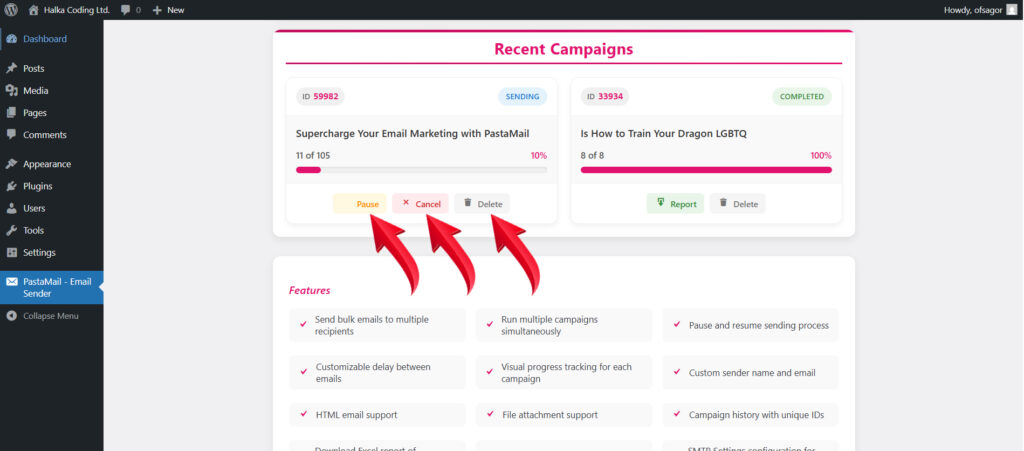
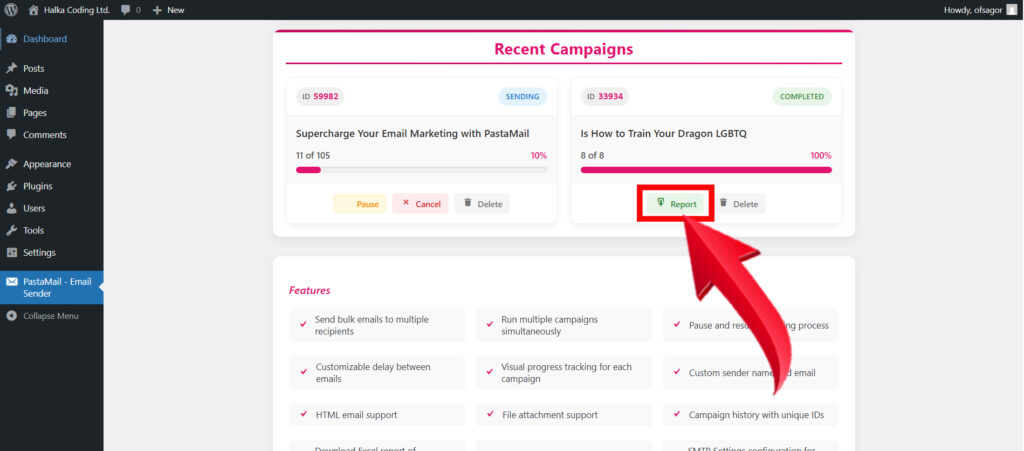
Pause, resume, or cancel campaigns in real time. Each campaign gets a unique ID, and progress is tracked with a visual status bar.
📨 SMTP Auto Configuration
Forget tech headaches. PastaMail auto-detects your domain settings and configures SSL-secured SMTP for reliable delivery.
📈 Real-Time Tracking & Reporting
Monitor delivery in real-time and download Excel/CSV reports to see what was sent, failed, or pending.
🎨 Easy Email Customization
Use the familiar WordPress editor to create beautiful HTML emails, add your own branding, and even include file attachments (up to 5MB).
📌 Why Choose PastaMail?
✅ Zero Configuration Needed
Just activate the plugin, set your SMTP once, and you’re ready to go.
✅ Ultra-Fast Campaign Execution
Emails are sent with optimized queue management, ensuring high speed without overloading your server.
✅ Works With Any Theme or Hosting
Whether you’re on shared hosting or VPS, PastaMail is optimized for all WordPress environments.
✅ Total Control, Anytime
Need to pause a campaign during peak server load? No problem. PastaMail gives you full control to manage your email sending process.
🧪 How to Use PastaMail in 3 Easy Steps
You don’t need to be a tech expert to use PastaMail. With its intuitive interface and seamless setup, you’ll be sending bulk emails in minutes.
🥇 Step 1: Install and Activate the Plugin
- Go to your WordPress Dashboard → Plugins → Add New
- Click Upload Plugin, choose the PastaMail ZIP file
- Click Install Now, then hit Activate
- You’ll see a new menu: PastaMail – Email Sender
🥈 Step 2: Set Up SMTP for Smooth Delivery
- Go to PastaMail → SMTP Settings
- Most settings are auto-filled based on your domain
- Customize the sender email (e.g., info@yourdomain.com)
- Save the settings—done!
💡 Why SMTP? It ensures your emails don’t land in spam.
🥉 Step 3: Create & Run Your Email Campaign
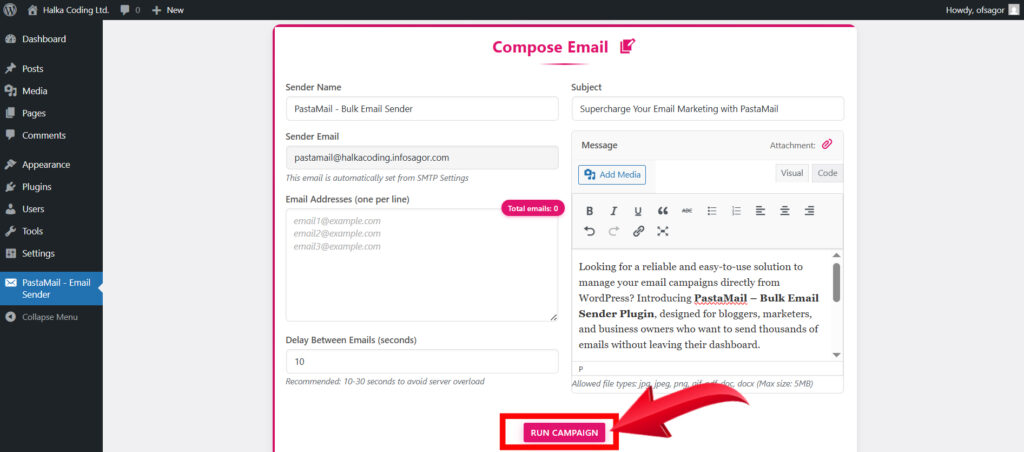
- Go to PastaMail – Email Sender
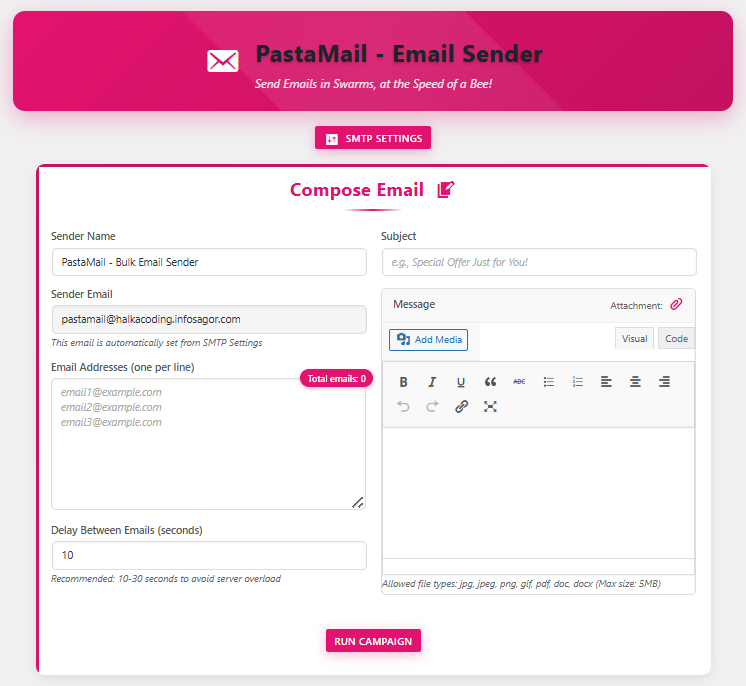
- Fill in the campaign form:
- Sender Name (e.g., Your Brand)
- Email Subject (what your audience sees first)
- Recipient Emails (paste multiple emails, one per line)
- Email Content (write or design using the WP editor)
- Add Attachments (optional – max 5MB)
- Delay Between Emails (10–30 sec recommended)
- Click Run Campaign
That’s it! Your emails are now being sent automatically, with a real-time progress bar showing the status.
📊 Bonus: Monitor & Download Reports
- Track all campaigns under the Recent Campaigns section
- Pause, resume, cancel, or delete campaigns anytime
- Download a CSV report for each campaign to see delivery results
⚙️ Top Use Cases for PastaMail
- 🔔 Newsletters for blog subscribers
- 💼 Client Updates and announcements
- 🎓 School or Course Notifications
- 🛒 Promotions and product launch emails
- 🧾 Event Reminders or RSVP lists
📋 Highlighted Benefits at a Glance
- 🟢 Unlimited email sending
- 📊 Live campaign tracking
- 🧩 Easy SMTP setup
- 📁 Attachment support
- 📥 Campaign history & exportable reports
- 🎯 Real-time status updates
- 🔒 Security features: nonce protection, input validation
- 📱 Fully mobile responsive admin interface
👨💻 Who is PastaMail For?
If you’re a:
- WordPress site owner
- Small business marketer
- Course creator
- Freelancer
- Agency handling client emails
Then PastaMail is the only bulk email tool you’ll ever need.
🧰 One Plugin, Complete Control
Whether you want to:
- Send one-time offers
- Update your subscribers
- Run multiple email campaigns
- Attach downloadable files
PastaMail handles it all—without slowing your site down.
❓ Frequently Asked Questions (FAQ)
💬 How many emails can I send with PastaMail?
There’s no built-in limit. You can send as many emails as your server allows. For better performance and deliverability, we recommend setting a short delay (10–30 seconds) between emails.
💬 Will my emails go to spam?
PastaMail uses SMTP with SSL for improved deliverability, but inbox placement also depends on your domain reputation, content, and email hygiene. Avoid spammy words and always include a clear sender name.
💬 Can I schedule emails for later?
Currently, PastaMail sends emails immediately when a campaign is launched. However, scheduled sending is on our roadmap for future updates.
💬 Can I pause or stop an ongoing campaign?
Yes! You can pause, resume, or permanently cancel any running campaign directly from the campaign dashboard.
💬 What types of files can I attach?
You can attach JPG, JPEG, PNG, GIF, PDF, DOC, and DOCX files. The maximum file size is 5MB.
💬 Can I add media or images in my email body?
Absolutely. Use the built-in WordPress editor to insert images, videos, or any other media into your email content.
💬 Does PastaMail support HTML emails?
Yes, you can create fully customized HTML emails using the WordPress content editor. This gives you total control over layout and design.
💬 How do I check if emails were successfully sent?
Each campaign provides a downloadable report in CSV format showing which emails were sent successfully and which failed.
💬 Is PastaMail compatible with all WordPress themes?
Yes. PastaMail runs entirely in the WordPress admin panel and works seamlessly with all themes.
💬 Is there a way to export my email list?
Currently, there’s no built-in list export feature, but you can manually copy your recipient list from the campaign textarea before sending.
✅ Final Thoughts
If you’re looking for a no-fuss, high-performance bulk email solution tailored for WordPress—PastaMail is the plugin you’ve been waiting for. From seamless SMTP setup to real-time campaign tracking, it puts total email control right at your fingertips.
Whether you’re a blogger, marketer, educator, or business owner, PastaMail helps you send smarter, faster, and safer—without ever leaving your WordPress dashboard.
🎯 Ready to send emails in swarms?
Install PastaMail today and transform the way you connect with your audience.